B2B Volume Pricing Table app icon
B2B Volume Pricing TableShopify theme app block
B2B Volume Pricing Table for Shopify

Show native Shopify B2B volume pricing on product pages.

Add a clean pricing table that displays the B2B quantity price breaks already configured in your Shopify catalogs. No discount engine. No duplicate setup. No custom theme code.

Native Shopify B2B pricingTheme app blockNo custom codeDisplay onlyVariant-aware
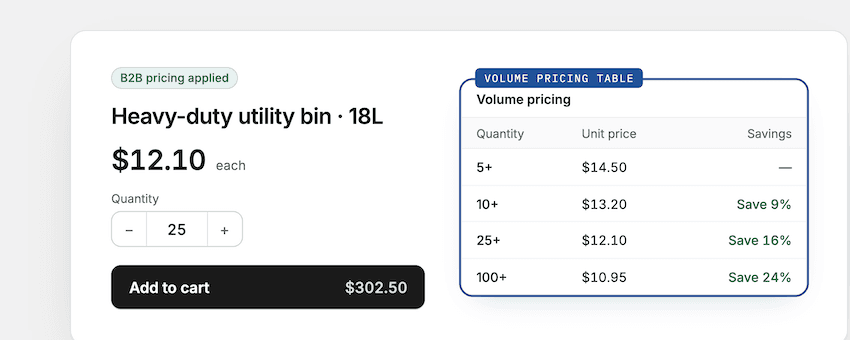
Volume pricing table displayed on a Shopify product page with B2B price tiers
Existing B2B price tiers, displayed clearly on the product page.
The gap

Your B2B price breaks are configured. But buyers may not see them.

Shopify B2B lets merchants configure catalog-specific pricing, quantity rules, and volume price breaks. But many themes do not clearly show those B2B price breaks on the product detail page. The result: buyers choose quantity without seeing the lower unit prices available at higher quantities.

  • B2B catalog pricing exists in Shopify, but the product page does not explain it clearly.
  • Buyers may miss quantity price breaks before adding to cart.
  • Theme support varies across free, paid, and custom themes.
  • Custom Liquid changes take time and can be hard to maintain.
  • Duplicate pricing setup in another discount app creates a second source of truth.
Step 1Configured in ShopifyB2B catalog pricing, quantity rules, and volume price breaks are set up.
Often missingMissing on product pageTheme does not surface B2B price breaks near the quantity selector.
With this appDisplayed with app blockThe pricing table renders alongside price and quantity for eligible B2B buyers.

B2B Volume Pricing Table solves only this storefront display gap.

How it works

Display B2B price breaks right where buyers choose quantity.

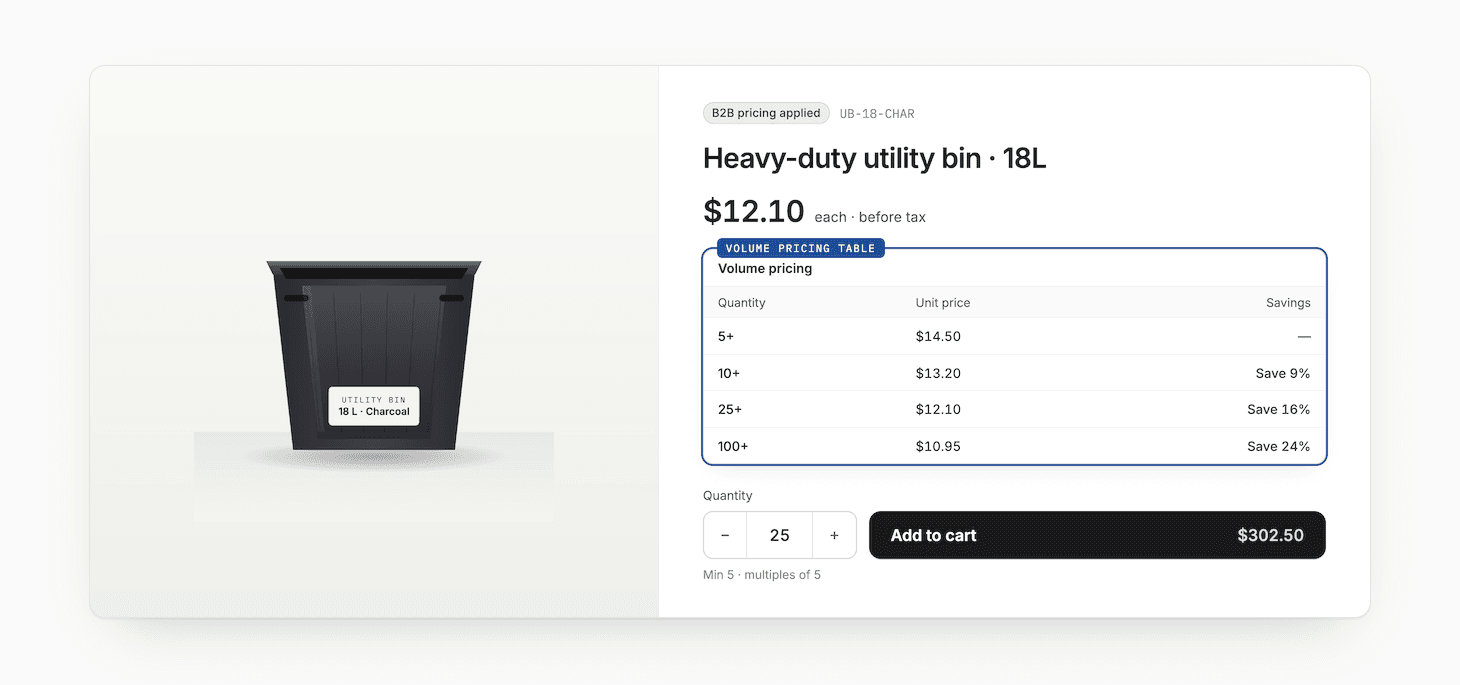
Place a clean volume pricing table beside the price, quantity selector, or Add to Cart button.

The app reads the applicable native Shopify B2B price breaks for the current product, variant, and buyer context, then renders them as a clean table on the product page.

  • Show B2B quantity price breaks directly on product pages
  • Display tiers near price, quantity selector, or Add to Cart
  • Help B2B buyers understand unit prices before they buy
  • Keep product-page experience clean for non-B2B shoppers

This app displays pricing that already exists in Shopify. It does not create or modify pricing rules.

Shopify product page with a volume pricing table showing quantity tiers and savings
Single source of truth

Use the price breaks already configured in Shopify B2B catalogs.

Shopify remains your source of truth. The app is only the display layer.

Your B2B pricing should not live in two places. B2B Volume Pricing Table reads existing native Shopify B2B catalog pricing and displays it on the storefront. No metafield pricing setup. No duplicate tier management. No checkout pricing override.

Not a pricing engine. Not a discount app. Not a wholesale suite. A focused display block for native Shopify B2B pricing.

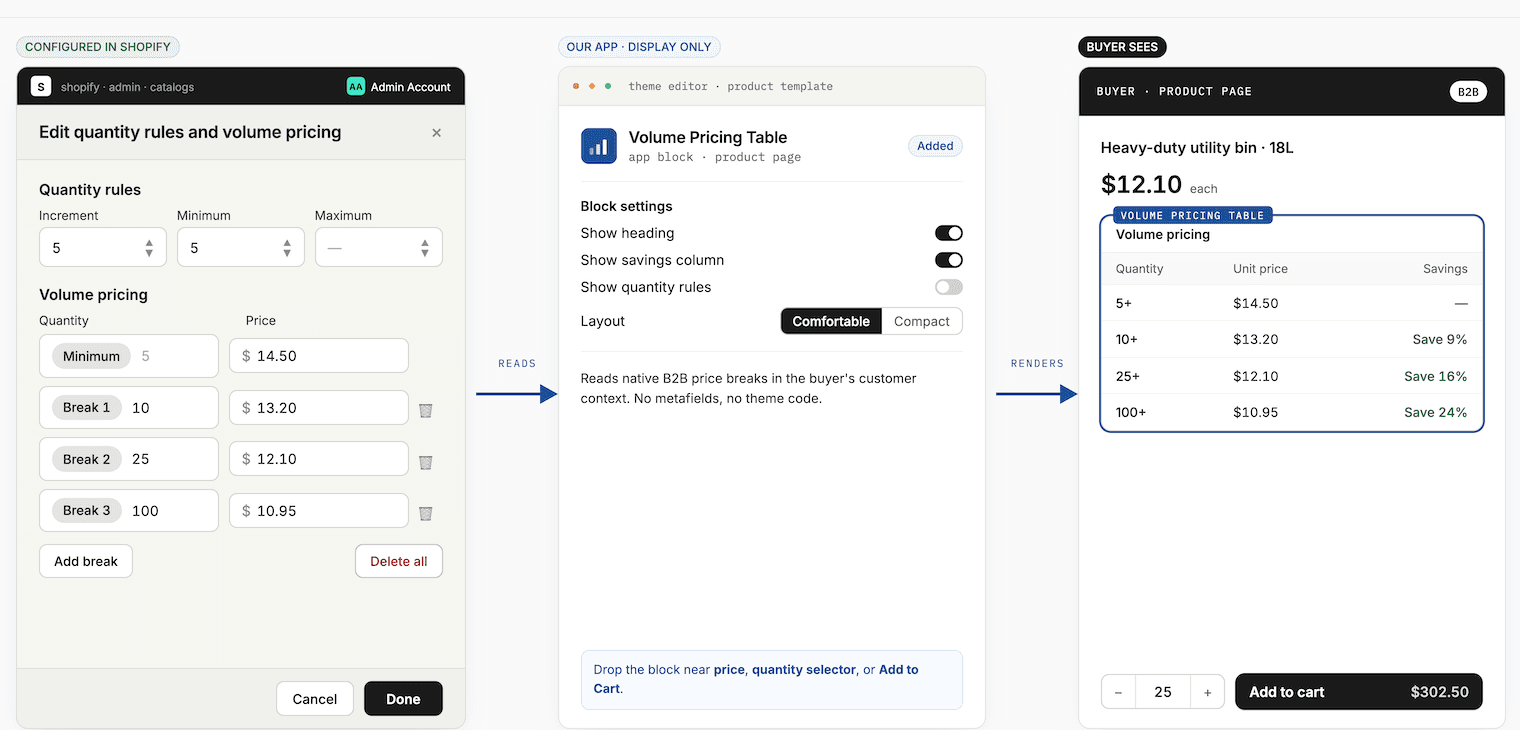
Diagram showing Shopify B2B catalog pricing read by the app block and rendered for the buyer
1
Configure in Shopify
Set up B2B catalog pricing, quantity rules, and volume price breaks in Shopify.
2
Add the app block
Place the Volume Pricing Table block on your product template.
3
Buyer sees price tiers
Eligible B2B buyers see the applicable tiers on the product page.
No-code theme app block

Add it to your product page without editing theme code.

Open the theme editor, add the app block, place it where it fits, and save.

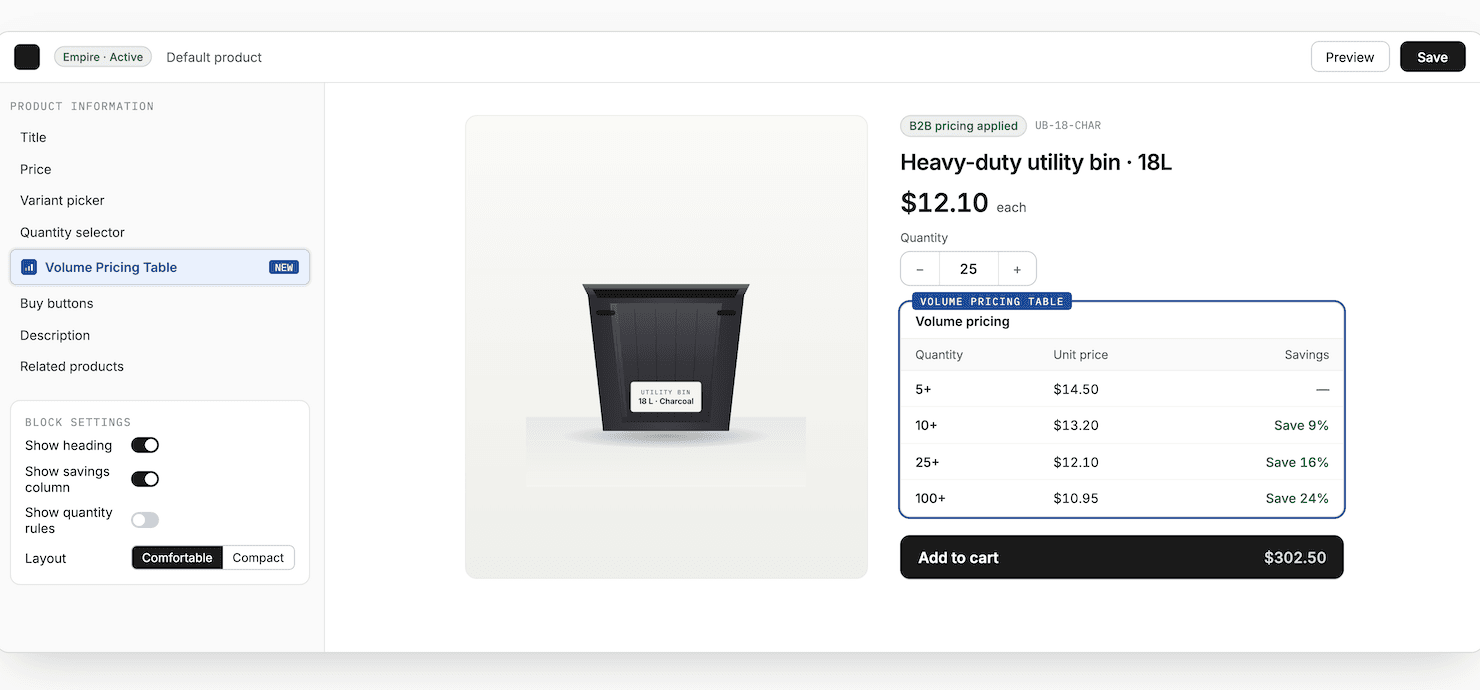
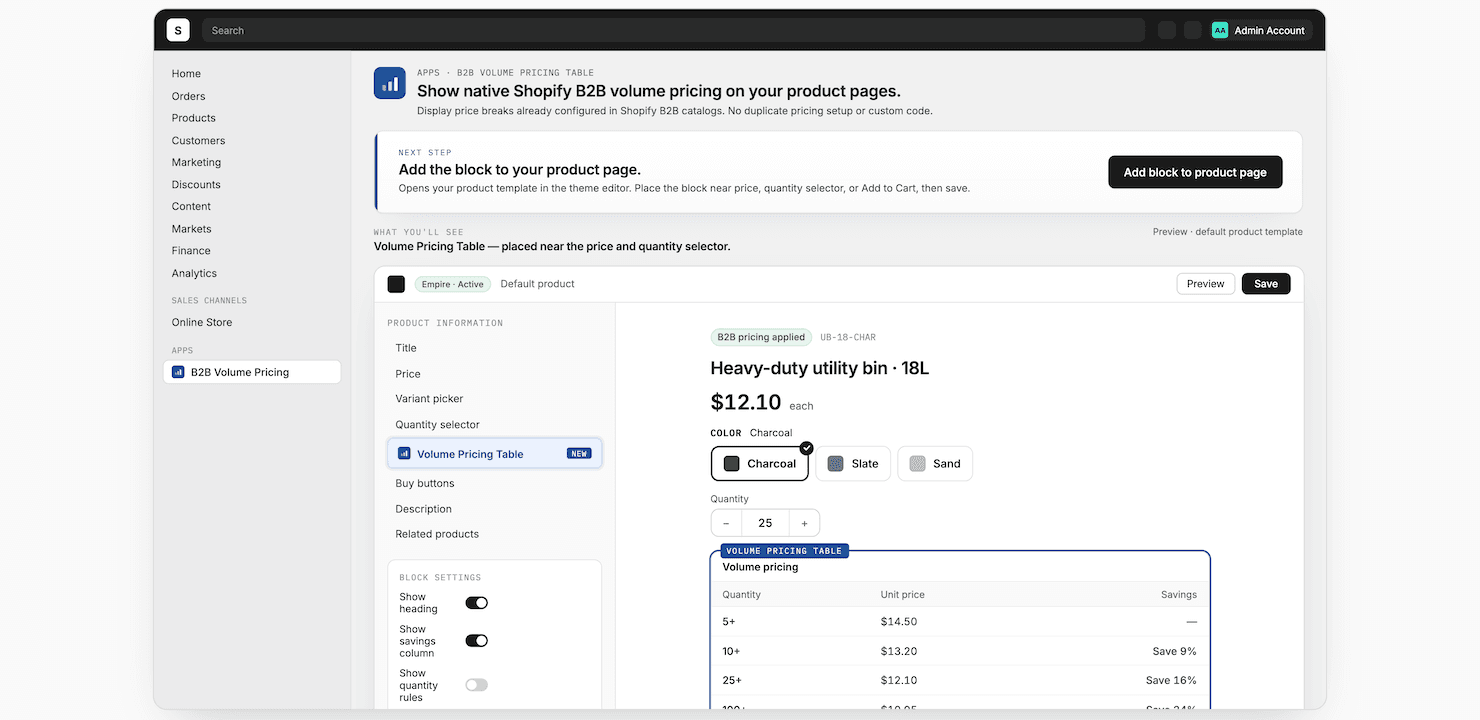
After installation, click Add block to product page from the app admin. The Shopify theme editor opens on your product template so you can place the pricing table near the price, quantity selector, or Add to Cart button.

The block can be moved like any other Shopify theme block.

Shopify theme editor with the Volume Pricing Table block placed on the product template
1
Install the app
Add B2B Volume Pricing Table from the Shopify App Store.
2
Click Add block to product page
Open the app from your Shopify admin.
3
Place the block in the theme editor
Drop it near price, quantity, or Add to Cart.
4
Save your product template
Preview as an eligible B2B buyer to confirm.
Variant support

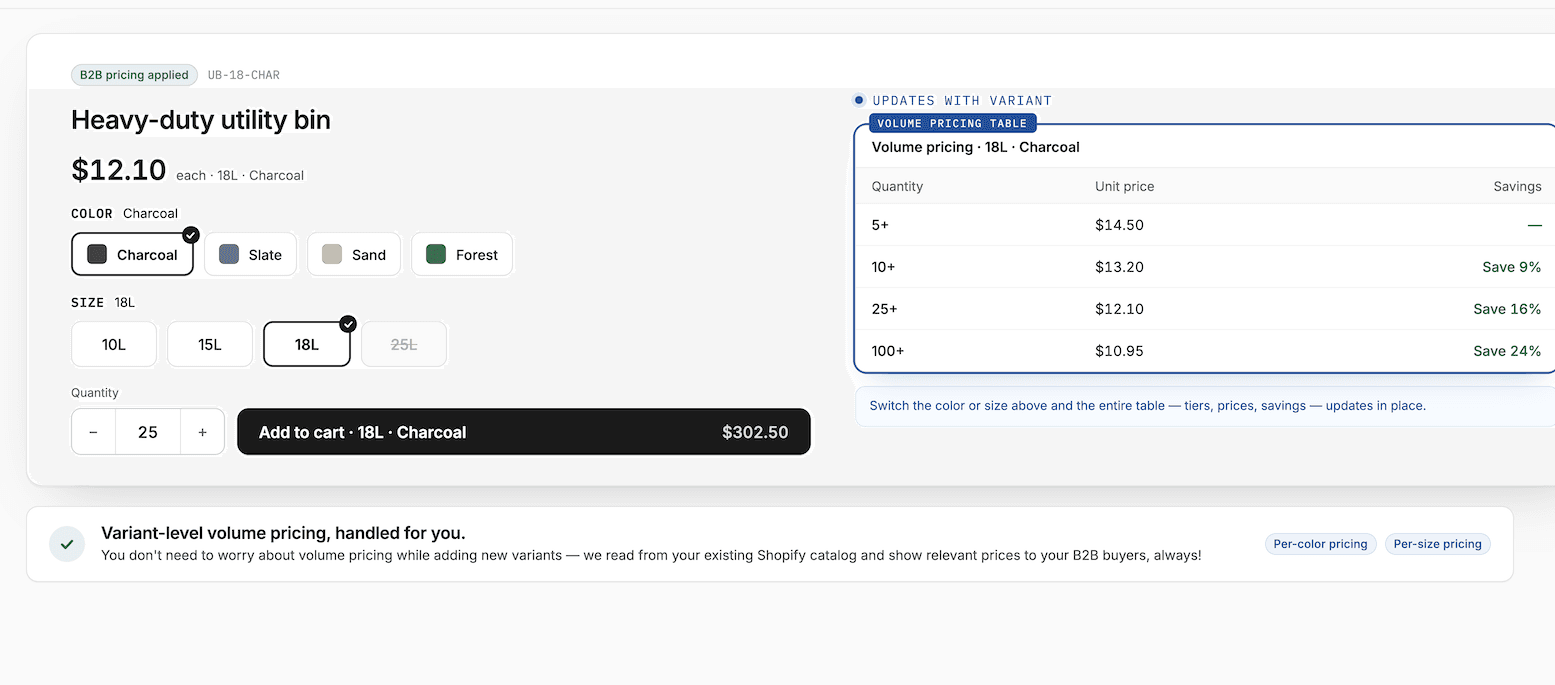
Pricing tiers update with the selected variant.

Support for variant-specific B2B volume pricing, including products with multiple options like size and color.

If your Shopify B2B catalog has volume pricing at the variant level, the table reflects the selected product variant. Buyers see the relevant price breaks as they switch options.

  • Supports selected variant pricing
  • Works with multi-option variants
  • Updates table based on buyer/product/variant context
  • Avoids showing irrelevant tiers from another variant

Designed to support selected variant pricing through Shopify’s native product and buyer context.

Variant-aware volume pricing table updating tiers as the buyer switches product options
Safe by default

Visible only when eligible B2B pricing applies.

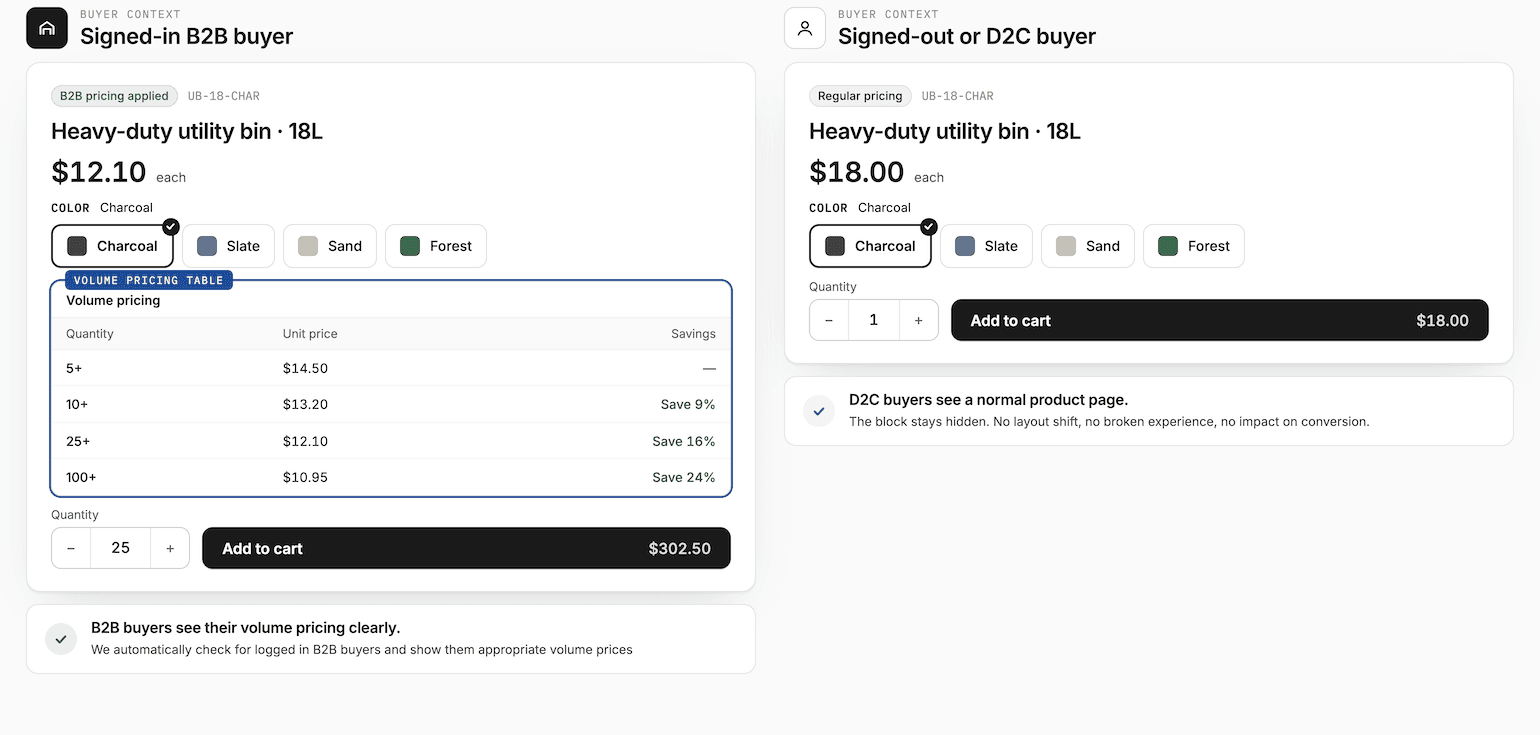
Logged-out shoppers and D2C customers see a normal product page.

The block is designed to stay hidden when no applicable B2B volume pricing is available for the current buyer, product, or variant. That keeps your regular storefront experience clean while still showing B2B buyers the price tiers they need.

  • Show tiers to eligible signed-in B2B buyers
  • Hide the block when no applicable B2B price breaks exist
  • Avoid exposing B2B-specific pricing to regular D2C shoppers
  • Useful for mixed D2C + B2B stores

Safe by default: if there is no matching B2B pricing context, the pricing table does not appear.

Side by side comparison of an eligible B2B buyer view with volume pricing and a D2C view without it
Built for B2B merchants

Built for native Shopify B2B merchants — not generic discount campaigns.

Use this app if…
  • You already use Shopify B2B catalogs
  • You have B2B quantity price breaks configured
  • Your theme does not clearly show volume pricing on PDPs
  • You want a no-code theme app block
  • You want Shopify to remain the pricing source of truth
  • You run a mixed D2C + B2B storefront
This is not for…
  • Creating new volume discounts
  • Running B2C quantity discount campaigns
  • Managing wholesale registrations
  • Building quote or approval workflows
  • Changing checkout pricing logic
  • Replacing Shopify B2B catalogs

If you need to create pricing rules, use a discount or wholesale pricing app. If your pricing already exists in Shopify B2B and you need to display it clearly, use B2B Volume Pricing Table.

Comparison

Different from volume discount apps.

Most volume pricing apps create or manage discounts. This app displays native Shopify B2B pricing.

CapabilityGeneric volume discount appsB2B Volume Pricing Table
Creates pricing rulesYesNo
Uses native Shopify B2B catalog pricingUsually no / variesYes
Duplicate tier setup requiredOften yesNo
Changes checkout pricingOften yesNo
Adds PDP display blockSometimesYes, focused on PDP display
Best forCreating discountsDisplaying existing B2B price breaks

Choose a discount app if you need to create offers. Choose B2B Volume Pricing Table if your B2B pricing is already configured in Shopify and your product page needs to show it.

Setup

One-click setup after installation.

Install the app, open it, and click Add block to product page.

The app admin is intentionally simple. There is no pricing dashboard to configure because the app does not create pricing. Your main action is to add the display block to your product template.

  • Simple embedded Shopify Admin app
  • Primary action: Add block to product page
  • Theme editor opens on your product template
  • Move the block where it fits your product page
  • Save and preview as an eligible B2B buyer

Shopify theme editor previews may show sample values if buyer-specific B2B pricing is not available in preview mode. Actual storefront display depends on the live buyer/product/variant context.

App admin screen showing the Add block to product page primary action
Use cases

Common use cases

Theme does not show B2B volume pricing
You configured Shopify B2B price breaks, but your product page does not display them clearly.

Paid or custom theme gap
Your theme works well for D2C but does not expose native B2B price breaks where buyers choose quantity.
Mixed D2C + B2B storefront
Regular shoppers should see a normal product page, while eligible B2B buyers see their quantity price breaks.
Variant-specific B2B pricing
Different product variants can have different B2B volume pricing, and buyers should see the relevant table.
Avoid duplicate pricing setup
You do not want to recreate the same price tiers inside a separate discount app.
FAQ

Frequently asked questions

Does B2B Volume Pricing Table create volume discounts?
No. The app does not create discounts or pricing rules. It displays existing native Shopify B2B quantity price breaks that are already configured in your Shopify catalogs.
Does this app work without Shopify B2B?
The app is designed for merchants using native Shopify B2B catalog pricing. If you want to create B2C quantity discounts or generic bulk discounts, this is not the right app.
Does the app change checkout pricing?
No. The app does not modify checkout pricing. Shopify’s native B2B catalog pricing remains the source of truth.
Do I need to edit theme code?
No. The pricing table is added as a Shopify theme app block through the theme editor.
Where should I place the volume pricing table?
Most merchants should place it near the product price, quantity selector, or Add to Cart button so B2B buyers can see price breaks before choosing quantity.
Will logged-out shoppers see B2B price breaks?
The block is designed to show only when applicable B2B pricing is available for the current buyer, product, and variant context. Logged-out or D2C shoppers should see a normal product page.
Does it support product variants?
Yes. The app is designed to reflect pricing for the selected product variant, including products with multiple variant options such as size and color.
Why do I see sample pricing in the theme editor preview?
Shopify does not always expose buyer-specific B2B pricing in theme editor preview. The app may show sample values in preview so you can see layout and setting changes. Actual display depends on the live storefront buyer context.
Is this a wholesale pricing app?
Not in the traditional sense. It does not manage wholesale pricing or create wholesale rules. It displays native Shopify B2B price breaks that already exist in your store.
Can I use this with any Shopify theme?
The app is built as a theme app block and is intended to work with Online Store 2.0 themes that support app blocks. Actual placement and styling can vary by theme.

Show B2B price breaks where buyers choose quantity.

Add a no-code volume pricing table for the Shopify B2B pricing you already configured.

Native Shopify B2B pricing · No duplicate setup · No discount engine · Theme app block